System settings reference
Every setting on the System settings page, with its allowed values, its default on a new server and its effect.
Location: Settings › System
Available to: Administrator
The page has three tabs: General, Pregnancy and Minimum ages. Each tab has its own Save button and saves only its own settings. A saved setting reaches the tablets at their next download of the settings. To change the settings step by step, see System settings.
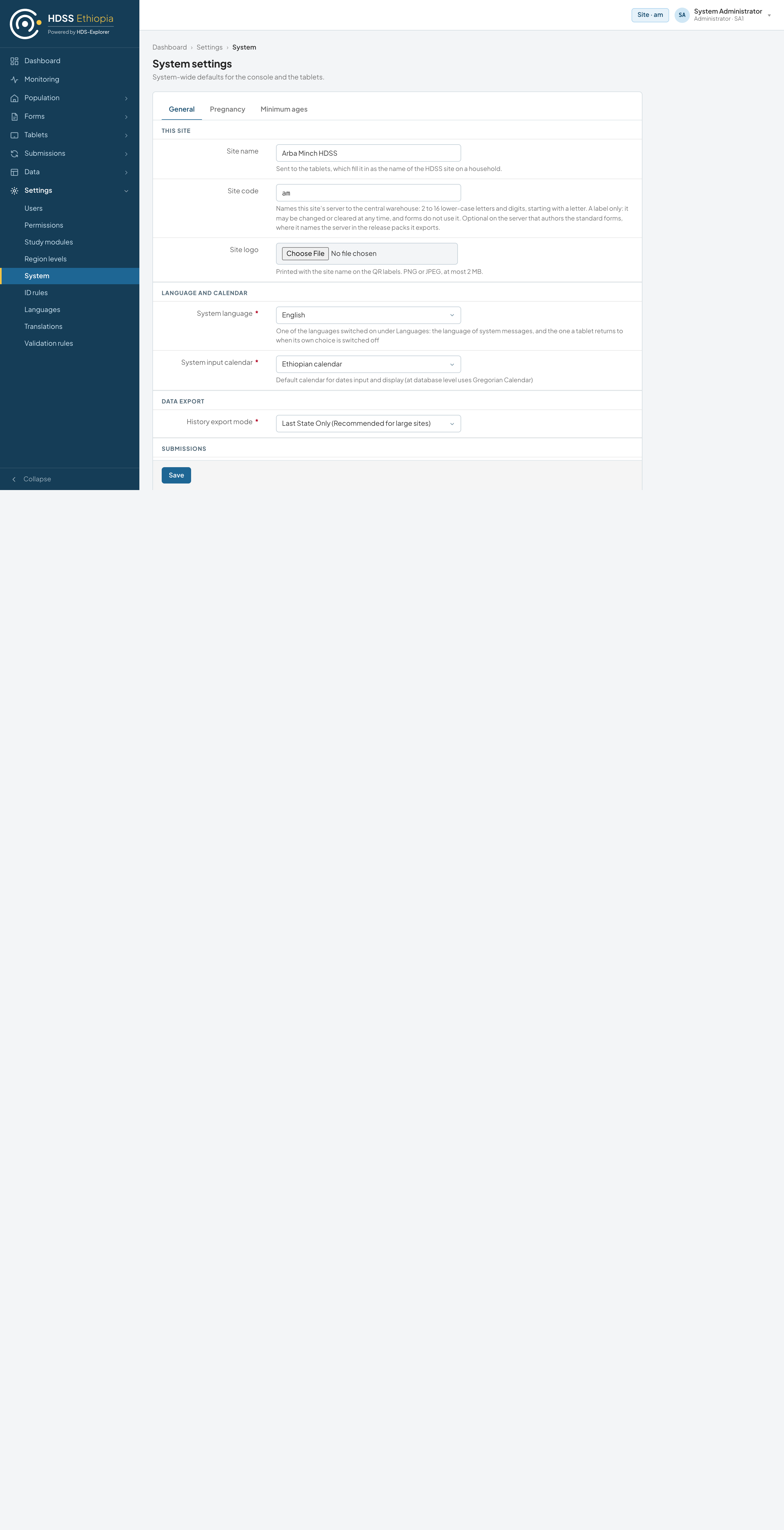
General tab
This site
| Setting | Allowed values | Default | Effect |
|---|---|---|---|
| Site name | Free text, at most 255 characters. May be empty. | Empty | Sent to the tablets, which fill it in as the name of the HDSS site on a household. |
| Site code | 2 to 16 lower-case letters and digits, starting with a letter. May be empty. | Empty | Names this server to the central warehouse. A label only: it can be changed or cleared at any time, and forms do not use it. |
| Site logo | A PNG or JPEG file of at most 2 MB. | None | Printed with the site name on the QR labels. |
Language and calendar
| Setting | Allowed values | Default | Effect |
|---|---|---|---|
| System language | One of the languages switched on under Settings › Languages. | English | The language of system messages, and the one a tablet returns to when its own choice is switched off. |
| System input calendar | Gregorian calendar, Ethiopian calendar | Ethiopian calendar | The calendar in which dates are entered and shown. Dates are always stored in the Gregorian calendar. See Ethiopian calendar. |
Data export
| Setting | Allowed values | Default | Effect |
|---|---|---|---|
| History export mode | Full history, Last State Only (Recommended for large sites) | Last State Only | What the tablet export sends of each individual's residencies and head relationships and of each household's visits. Full history sends every one; Last State Only sends only the latest, which keeps the tablet download small. |
Submissions
| Setting | Allowed values | Default | Effect |
|---|---|---|---|
| When data is uploaded | Keep it waiting, Validate it, Validate and execute it | Validate it | Keep it waiting: records wait for a Validate & execute run; nothing is validated until someone runs it. Validate it: waiting records are validated shortly after uploads pause, so Review shows what would be refused; nothing is written to the register and uploads are never held up. Validate and execute it: records are validated and go into the register as they arrive; flagged records are not held. |
Data collection
| Setting | Allowed values | Default | Effect |
|---|---|---|---|
| Region heads | Yes, No | No | On: heads of areas are recorded. The tablet offers the change of head of an area only for area levels marked Has head under Settings › Region levels. |
| Require GPS on visits | Yes, No | No | On: the visit form asks for the GPS point on every visit, including a visit where nobody can be interviewed. Off: the GPS point is asked only when the visit can take place. |
| One household per location | Yes, No | Yes, unless the register already has a location shared by households | On: a household is registered only in a location where no household lives, and a household moves only into an empty one. The tablet offers only free locations and the server refuses the rest. Off: a location takes any number of households. Cannot be switched on while two households share a location; the console names the locations. Forced on, and not editable, when the ID rules give a household its location's ID. |
| Household pre-registration | Yes, No | No, unless the register already has pre-registered households | On: a fieldworker can first list a household (area, household code, name and modules only) and complete its registration later, possibly on another tablet. Off: + New household on the tablet goes straight to the full registration. Households already pre-registered can still be completed. |
| Export after execution | Yes, No | Yes | On: the Households and Events exports start by themselves when an execution run finishes, after records are executed at upload, and after a change made on the console. Off: a data manager runs the exports. |
| A man may have more than one open union | Yes, No | Yes | Off: a second open marital relationship is refused for anyone. A woman's second open union is always refused. |
| Share area accounts with tablets | Yes, No | Yes | On: a tablet also receives the accounts of the fieldworkers who share an area with the user who downloads, so they can sign in on it. Off: only that user's account. |
| Visit GPS radius (metres) | A whole number, 1 or more | 100 | A visit taken farther than this from the location's stored GPS point shows a warning on the tablet and asks for a reason. The visit is never refused. |
| Fewest weeks between two pregnancy outcomes | A whole number, 0 or more | 20 | A pregnancy outcome dated less than this many weeks after the mother's previous outcome is refused on the tablet and at execution. |
| Weeks of pregnancy against the LMP | A whole number, 0 or more | 2 | When the weeks of pregnancy a woman gives differ by more than this from the weeks counted from her last menstrual period (LMP), the pregnancy form shows a note to check the answer. The note does not stop the form. |
| Days to wait after a death before its verbal autopsy | A whole number, 0 or more | 40 | A death without a completed verbal autopsy is flagged once this many days have passed since the death; 0 flags it at once. The flag shows on the tablet's visit screen, and the death is listed on the Required forms page. |
| Keep closed upload errors (days) | A whole number, 0 or more | 180 | An execution run removes closed entries of the error log older than this. Closed means executed again, resolved, or record deleted. An open error is never removed. 0 keeps every entry. |
| Mark rates as small numbers under (person-years) | A whole number, 0 or more | 100 | Rates of an area with fewer person-years than this are marked as small numbers on the dashboard, the round report and their downloads. 0 marks none. |
| Wait after the last upload before exporting (seconds) | A whole number, 0 or more | 60 | When records are executed at upload, the exports start once no record has been executed for this long, so the uploads of many tablets make one export. Uploads that never pause are exported after ten times this long. A change made on the console waits the same time. 0 exports at once. |
Dashboard data
| Setting | Allowed values | Default | Effect |
|---|---|---|---|
| Update the dashboard data | Every 15 minutes, Every hour, Every night at a time, Custom (cron) | Every night at 02:00 | When the summary tables that the dashboard reads are rebuilt. Until a rebuild ends, the dashboard shows the numbers of the previous one. When the server starts, it rebuilds them if they are older than one period. Custom takes a cron expression of six fields, seconds first: 0 30 2 * * * is every night at 02:30. |
| Also update after data changes | Yes, No | Yes | On: the summary tables are also rebuilt after an execution run, and after uploads and console changes once they pause for the wait after the last upload. |
The section also shows Last update and the next update time.
Forms
| Setting | Allowed values | Default | Effect |
|---|---|---|---|
| Publishing needs a second person's approval | Yes, No | No | On: a draft form is published only after someone other than its author approves it. Off: whoever opens Forms publishes. |
Pregnancy tab
| Setting | Allowed values | Default | Effect |
|---|---|---|---|
| Max antepartum visits | 1 to 20 | 8 | How many pregnancy visits happen before delivery. One Visit row per visit appears below it, each with the pregnancy week of that visit. Default weeks: 12, 20, 26, 30, 34, 36, 38, 40. |
| Max postpartum visits | 1 to 20 | 4 | How many visits happen after delivery. One Visit row per visit, each with the day after delivery. Default days: 3, 7, 21, 42. |
| Minimum age (years) | Read only | 12 | The youngest age at which a pregnancy is registered: the minimum age of a mother. Change it with Mother on the Minimum ages tab. |
| Maximum age (years) | From the minimum age of a mother to 120 | 49 | The oldest age at which a pregnancy is registered. |
Minimum ages tab
The youngest age, in whole years, at which a person can be given each role. Every value is a whole number from 1 to 120. A change applies to the records checked from then on, with no restart, and reaches a tablet at its next download of the settings.
| Setting | Default | Effect |
|---|---|---|
| Head of household | 18 | The youngest head of household. |
| Mother | 12 | The youngest mother. Also the minimum age for a pregnancy registration. Cannot be above the maximum age for a pregnancy registration. |
| Father | 12 | The youngest father. |
| Spouse | 16 | The youngest partner in a marital relationship. |
| Visit respondent | 18 | The youngest person who can answer for the household during a visit. |
Actions
| Action | Description |
|---|---|
| Save | Saves the settings of the open tab. A refused value is named in a message. On the General and Pregnancy tabs the other values are still saved; on the Minimum ages tab nothing is saved until every age is valid. |
| Update now | Rebuilds the dashboard summary tables now, or after the rebuild that is running. |