Identifier rules
Choose how the IDs of areas, locations, households, individuals, visits and pregnancies are built. Do this before any data is entered: a rule locks as soon as records of its kind exist.
Before you begin
- Required role: Administrator
- Prerequisites: System settings are saved. No areas, locations, households or individuals have been created or imported yet.
- Migrating sites: decide whether the new IDs must match the IDs of the old system. See Migration paths.
Warning
A rule is Locked once records of its kind exist, and the running number of an ID is never reused. Changing the identifier format later means starting again with an empty database.
How an ID is built
Each kind of ID has a rule with these parts:
- Prefix: fixed characters at the start (capital letters, digits and hyphens, at most 6).
- Parts: the codes the ID is built from, in order, written
source:charactersand separated by commas, for exampleregion:3. The sources areregion(the area of the lowest level),location,user,household,member,roundandname.text:-adds fixed characters such as a hyphen. - Digits: the length of the running number, which always comes last.
- First number: the running number of the first record, 0 or 1.
Every household is in a location, and a location is numbered under its area. A household either takes its location's ID (the location holds one household) or is numbered under it. A household that moves keeps its ID, and so do its individuals and visits.
The presets
A new server starts with the Standard preset. The examples below use the area code TXU and the user code PF1.
| Preset | Description | Location | Household | Individual | Visit |
|---|---|---|---|---|---|
| Default | Area + user code + 3 digits. The household takes its location's ID. | TXUPF1001 | TXUPF1001 | TXUPF1001001 | TXUPF1001-000 |
| Simple | Area + 6 digits. The household takes its location's ID. | TXU000001 | TXU000001 | TXU000001001 | TXU000001-000 |
| Compound-based | Location + 6 digits, household + 3, individual + 3. | TXU000001 | TXU000001001 | TXU000001001001 | TXU000001001-000 |
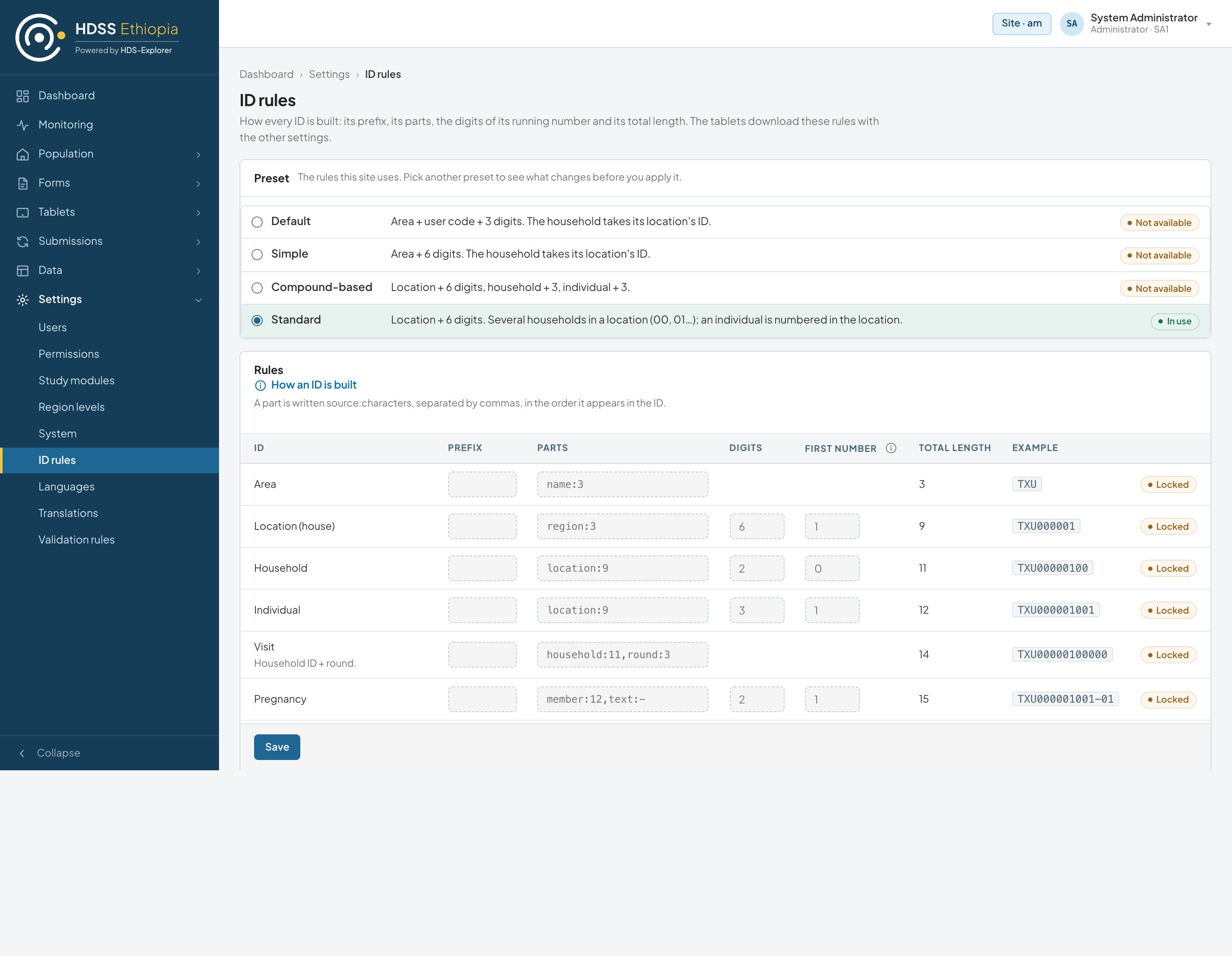
| Standard | Location + 6 digits. Several households in a location (00, 01…); an individual is numbered in the location. | TXU000001 | TXU00000100 | TXU000001001 | TXU00000100000 |
Recommendation: keep Standard for a new site. It allows several households in one location and keeps IDs short. Choose Compound-based if a location is a compound that often holds many households. With Default or Simple, a location holds only one household, and One household per location under Settings › System is forced on.
Apply a preset
-
Open Settings › ID rules. Under Preset, the preset in use is marked In use.
-
Select another preset. The page shows each ID Now and After the change.
- Check the examples, then select Apply followed by the preset name, or Cancel. A preset that cannot be applied, because records already exist for some kinds, is marked Not available and the page says which kinds are locked.
Edit a rule by hand
Edit a rule only to match an existing ID format, for example the IDs of the system a site is migrating from.
- Open Settings › ID rules.
- Under Rules, change the Prefix, Parts, Digits or First number of an Open rule. The Total length and Example columns show the result. Select How an ID is built for help.
- Select Save. If a rule cannot be read or breaks a limit, the page lists the problem and saves nothing.
When the rules match no preset, the page shows Set by the site and names the nearest preset.
Result
The page confirms that the ID rules were saved. The settings files that tablets download are written again at once, and tablets use the new rules after their next settings download. Every new ID follows the rules.