HDSS concepts
The platform is built on the concepts of a Health and Demographic Surveillance System (HDSS), as used across the INDEPTH Network of HDSS sites: areas, locations, households, individuals, residencies, rounds, visits and demographic events. This page explains each concept and how it appears in the server console and the tablet application.
The register
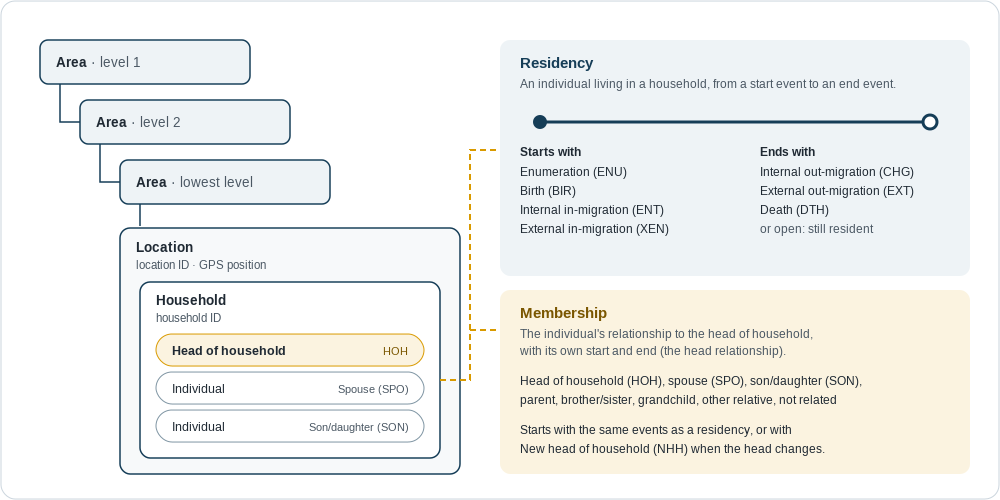
The register is the platform's record of the surveillance population. It is organized from the largest area down to the individual.
Areas
An administrative area is a part of the surveillance area. Areas form a hierarchy of up to ten levels, from the largest area down; each site names the levels it uses, for example region, zone, woreda and kebele. Every location is in an area of the lowest level in use.
An area can have a head (an area head, such as a village leader) if its level is set to have one.
In the console, areas are listed on Population › Regions and the levels are named on Settings › Region levels. This documentation says "area" in prose and uses the console labels only to name those screens.
Locations
A location is the physical dwelling where households live: a house or another building, with its GPS position. Its location ID is the number written on the dwelling. A location stays in the register when its households move away, so that its number and position are kept.
Households
A household is a group of individuals who live together in one location under one head of household. It has a household ID and is in one location at a time. A household that moves to another location inside the surveillance area keeps its ID; this is a household relocation.
There are two types of household:
- A regular household has a head of household chosen from its members.
- An institutional household, such as an orphanage, a prison or a boarding school, is managed by a proxy head: the person responsible for the institution.
Individuals
An individual is a person in the register, identified by an individual ID. The console lists individuals on Population › Members. An individual keeps the same ID for life, wherever they move inside the surveillance area. A former resident who returns from outside the area is recorded as a re-entry and keeps their earlier record.
Residency
A residency is the period during which an individual lives in a household. It starts with a start event and ends with an end event; while the individual still lives there, the residency is open.
| Starts with | Code | Ends with | Code |
|---|---|---|---|
| Enumeration | ENU | Internal out-migration | CHG |
| Birth | BIR | External out-migration | EXT |
| Internal in-migration | ENT | Death | DTH |
| External in-migration | XEN |
An individual who moves between households has several residencies, one after another, never two open at once. The residents of a household on a given day are the individuals with a residency open on that day. Residencies are the basis of person-years: the time each individual spent under surveillance, which is the denominator of the rates on the dashboard.
Membership and the head of household
A membership records how an individual is related to the head of household: head of household (HOH), spouse (SPO), son or daughter (SON), parent, brother or sister, grandchild, other relative or not related. The platform calls this record the head relationship. Like a residency, it has a start and an end, so that when the head changes, the old relationships end and new ones start with the event New head of household (NHH).
A regular household has one head of household at a time. When the head dies or leaves, the fieldworker records a change of head of household.
Individuals can also have marital relationships with each other, recorded with their start and end.
Rounds and visits
Rounds
A round is one pass through the whole surveillance area, in which every household is visited once. Rounds are numbered from 0. Round 0 is the baseline round: the baseline enumeration, in which every location, household and individual is first registered. Each following round is a follow-up round that updates the register.
Rounds are created on Population › Rounds, each with a start and end date. The console can show dates in the Ethiopian calendar (EC). See Ethiopian calendar.
Visits
A visit is a fieldworker's visit to one household in one round. A household has one visit per round. The visit records the date, the respondent (the person who answered for the household), and whether the visit was possible. Every event recorded during the visit is linked to it.
The visit code is the household ID followed by the round number, so it identifies both the household and the round.
Demographic events
A demographic event is a change in the population that the fieldworker records during a visit. Each event is a form on the tablet. The table lists the events with the names the tablet shows on the visit screen.
| Event | On the tablet | What it records |
|---|---|---|
| Enumeration | Member enumeration | An individual living in the household who is not yet in the register. At baseline every individual is enumerated. |
| Pregnancy registration | Pregnancy registration | A woman's current pregnancy, with its expected delivery date. |
| Pregnancy surveillance | Pregnancy surveillance | A follow-up visit of a registered pregnancy. |
| Pregnancy outcome | Birth registration | The end of a pregnancy: live birth, stillbirth, miscarriage or abortion. Each live-born child is registered as a new individual, with a residency that starts with birth. |
| Death | Death registration | The death of an individual. Ends the individual's residency. |
| Internal in-migration | Internal in-migration | An individual from another household in the surveillance area moving into this household. |
| External in-migration | External in-migration | An individual coming from outside the surveillance area: a first entry, or a re-entry of a former resident. |
| Out-migration | Out-migration registration | An individual leaving the household: internal (to another household in the area) or external (out of the area). |
| Change of head of household | Change head of household | A new head of household, and the new relationships to the head. |
| Change of proxy head | Change proxy head | A new proxy head of an institutional household. |
| Household relocation | Household relocation | The whole household moving to another location in the area. It starts and ends no residency. |
| Marital relationship | Marital relationship | A marriage or union, or its end. |
| Member update | Member update | A change to an individual's details. |
| Household correction | Household correction | A correction to a household's details. |
Corrections to the register are made the same way, as forms in a visit, so that every change is recorded with who made it and when.
Migration: internal and external
The platform distinguishes two kinds of migration, as INDEPTH sites do:
- Internal migration is a move between two households that are both in the surveillance area. The individual's residency in the old household ends with internal out-migration (CHG) and a new one starts in the new household with internal in-migration (ENT). The individual stays in the surveillance population.
- External migration crosses the boundary of the surveillance area. External out-migration (EXT) ends the individual's time under surveillance; external in-migration (XEN) starts it. A returning former resident is recorded as a re-entry.
Deaths and verbal autopsy
A death ends the individual's residency. After a death is registered, the tablet offers a Verbal autopsy: an interview with a relative or caregiver about the signs and symptoms before death, used to assign a probable cause. The form follows the age at death: neonate (under 28 days), child (under 12 years) or adult. A death with no one who can answer can be marked as having no informant on the console.
Forms: core events, core observations and add-on modules
Every form the platform collects is one of three kinds. The console shows the kind on Forms.
- A core event is a form that changes the register: the demographic events above, the visit, and the registration of areas, locations and households. Core events are the same at every site.
- A core observation is a standard questionnaire that every site collects but that does not change the register: socioeconomic status (SES), collected once per household per round for the head of household, and verbal autopsy.
- An add-on module form is a questionnaire for a study, such as family planning or food insecurity. It is grouped in a study module, and a site adds it to its standard forms. A site can add questions to a standard form but cannot change the standard ones.
Submissions and the register
An uploaded form is a submission: a record of what the fieldworker saw. It does not change the register by itself. The register changes only when the submission is executed on Submissions › Validate & execute, after it has passed every check against the register. A submission that fails a check becomes a rejected submission and waits on Submissions › Review until it is corrected or excluded.
This separation keeps the register consistent: for example, a death is not applied to an individual who no longer lives in the household. See Data submission lifecycle.
In the applications
| Concept | Server console | Tablet application |
|---|---|---|
| Area | Population › Regions; levels on Settings › Region levels | The areas assigned to the user |
| Location, household | Population › Locations, Households | Household search and the household's visit screen |
| Individual, residency, membership | Population › Members: an individual's page shows residencies and head relationships | Residents and former members on the visit screen |
| Round | Population › Rounds | The current round, downloaded with the settings |
| Visit and events | Submissions; Data › Residency events | The visit screen and its event tiles |
| Rates and person-years | Dashboard; Data › Round report |