Platform overview
The HDSS Ethiopia platform keeps the population register of a Health and Demographic Surveillance System (HDSS) site: every location, household and individual in the surveillance area, and every demographic event that happens to them. The register stays current because fieldworkers visit every household in every round and record what has changed since the last visit.
What the platform does
An HDSS follows a defined population over time. Instead of a one-off survey, it counts the whole population once, in the baseline enumeration, and then returns to every household at regular intervals, in rounds, to record births, deaths, pregnancies, in-migrations and out-migrations. From these events the site can calculate rates for its population, such as mortality and fertility per 1,000 person-years.
The platform supports that work from start to end:
- It holds the register of administrative areas, locations, households and individuals, with each individual's residency and relationship to the head of household.
- It gives fieldworkers the forms to record a household visit and its demographic events, on a tablet that works without a network connection.
- It checks every uploaded record against the register before the register changes, and keeps the records that fail for review.
- It produces datasets and reports for monitoring the round and for analysis.
The terms used here are explained in HDSS concepts and defined in the Glossary.
The two applications
The platform has two applications that work together.
The server console is a web application. Administrators set up the site in it (areas, forms, rounds, users and identifier rules); data managers review and correct the uploaded data and take out datasets; supervisors follow their areas and repair the records of their fieldworkers; monitors and researchers read the dashboard and the data they are given. The console runs on the site's server and holds the register.
The tablet application is an Android application. Fieldworkers use it to find a household, conduct the visit and record the demographic events of the household and its individuals. A tablet keeps a copy of the register for its areas and works offline; it needs a connection only to download and to upload.
Which parts of each application a person can use depends on their role. See User roles and permissions.
How data moves
Data moves in a loop between the console and the tablets. Each round goes around the loop once.
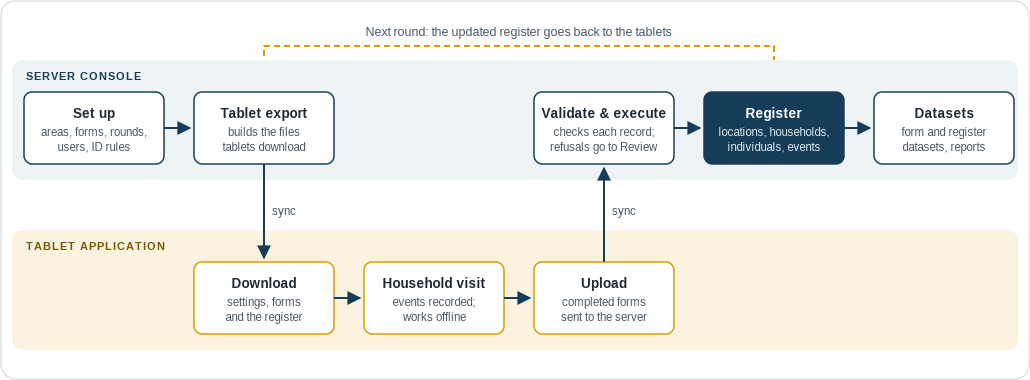
- Set up. On the console, the site defines its areas, forms, rounds, users and ID rules. See Site Configuration.
- Tablet export. The console builds the files tablets download: settings, forms, users, the register and follow-up lists.
- Download. A tablet synchronizes with the server and takes those files. By default a fieldworker account downloads the settings and the forms; the register is brought to the tablet by a supervisor or data manager. An administrator can change this on Settings › Permissions.
- Household visit. The fieldworker opens one visit for the household in the current round and records its demographic events: enumeration of new individuals, births, pregnancies, pregnancy outcomes, deaths, in-migrations and out-migrations, changes of head of household and the observations the site collects.
- Upload. When the tablet has a connection, it sends the completed forms to the server. An uploaded form is a submission; it does not change the register yet.
- Validate & execute. The console checks each submission against the register, in order, as if the ones before it had already been applied. A submission that passes is executed: the register changes. A submission that fails becomes a rejected submission and waits on Submissions › Review for a correction. See Data submission lifecycle.
- Register. The register now holds the round's changes. The next tablet export carries them to the tablets for the next round.
- Datasets. Data managers, supervisors and researchers take form datasets, register datasets and reports from Data. See Data access and export.
Note
A site can set the console to execute records as they are uploaded instead of in a separate run. The checks are the same; only the timing changes.
In the applications
| You want to | Where |
|---|---|
| See the state of the current round | Console: Dashboard and Monitoring. See Dashboard and monitoring. |
| Look up a household or an individual | Console: Population. Tablet: the household search. |
| Prepare the tablets | Console: Tablets › Tablet export. See Tablets. |
| Record a visit | Tablet. See Conducting a household visit. |
| Apply uploaded data to the register | Console: Submissions › Validate & execute. See Submissions. |
| Take out data | Console: Data. See Data. |